Core concepts
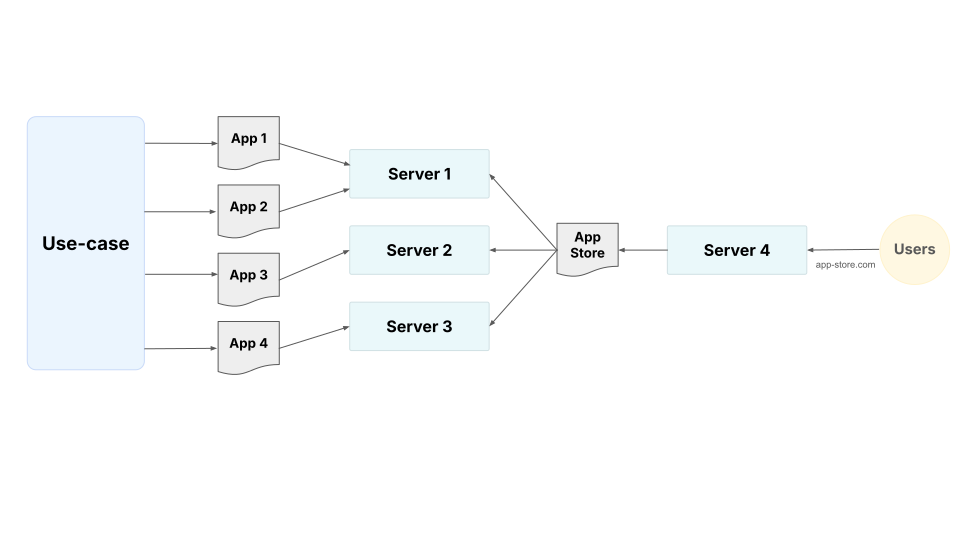
General view of web app deployment
- We always start with a use-case
- Depending on the use-case and other factors (discussed below), we choose the right tool to build the app
- Apps are deployed to servers (local or remote)
- There could be an app store (portfolio or gallery) that consolidates URLs of all the other apps. This may be deployed to the same servers as the other apps.
For this tutorial
- HuggingFace and Google Cloud to host our apps
- Quarto as the app store

Building a web app
Building a Python web app involves answering these “Why”, “What” and “How” questions:
- What’s my objective? (Why?)
- For example,
- Share an idea with my team or community
- Showcase what my code can do
- Wireframe a new feature
- Show off dvertise my abilities on my website and resume
- For example,
- What do I want to communicate? (What?)
- For example,
- The impact of rising global temperatures on drinking water quality
- My grasp of LLM concepts
- Track data quality or SW error rates
- For example,
- Which tool stack should I use (How?)
- What’s the expected turnaround time? (ease of development)
- What’s the available UI component library? (capability)
- How many users? (scalability)
- How frequently will we alter the scope? (maintenance)
- How will people access it? (ease of deployment)
Python Dashboard Framework Scoring Analysis
Framework Performance Matrix
| Framework | Development Speed | UI Components | User Scalability | Maintenance | Deployment | Overall Score |
|---|---|---|---|---|---|---|
| Streamlit | 7 | 8 | 6 | 7 | 9 | 7.4 |
| Gradio | 8 | 8 | 7 | 7 | 9 | 7.8 |
| Plotly Dash | 5 | 10 | 9 | 8 | 9 | 8.2 |
| Python Shiny | 6 | 7.5 | 8 | 8 | 9 | 7.7 |
| Jupyter Widgets/Voila | 9 | 9 | 5 | 5 | 7 | 7.0 |
| Fast Dash | 10 | 10 | 5 | 6 | 9 | 8.0 |
Deploying an app
- Package your app code, data, configuration
- Send to a server (local or remote)
- Configure so users can access

There are many ways your app data can be sent to a server, dependencies installed and the execution script run. A universal way to deploy is to containerize the application with Docker and then deploy it to an endpoint.
Docker for packaging and deployment
Docker is an open-source platform that automates the deployment, scaling, and management of applications using containerization. Containers package an application and its dependencies together, ensuring consistency across different environments. This makes it easier to develop, ship, and run applications reliably.
- Consistency: Same environment across dev, staging, and production
- Isolation: Dependencies don’t conflict with host system
- Portability: Deploy anywhere Docker runs
- Scalability: Easy horizontal scaling with orchestration
Simple steps in deploying a Python app
- Local Development → Create and test your app
- Dockerization → Package app with dependencies
- Version Control → Track changes with Git
- Server Deployment → Clone and run on remote server
1. Local Development Setup
Create a your app
# app.py
from fast_dash import FastDash

def simple_text_to_text(input_text: str) -> str:
    return input_text

app = FastDash(simple_text_to_text)

if __name__ == '__main__':
    app.run()
Create Requirements File
# requirements.txt
fast-dash==0.2.13
2. Dockerize the Application
Create Dockerfile
FROM python:3.11-slim

WORKDIR /app

# Copy requirements first for better caching
COPY requirements.txt .
RUN pip install --no-cache-dir -r requirements.txt

# Copy application code
COPY . .

# Expose port
EXPOSE 5000

# Run the application
CMD ["python", "app.py"]
Test Locally
# Build the image
docker build -t my-app .

# Run the container
docker run -p 5000:5000 my-app
Visit http://localhost:5000 to test your app.
3. Version Control with Git
Initialize Git Repository
git init
git add .
git commit -m "Initial commit: my app with Docker"
Push to Remote Repository
git remote add origin <your-repo-url>
git push -u origin main
4. Server Deployment
Upload Code to Server
# SSH into your server
ssh user@your-server-ip

# Clone your repository
git clone <your-repo-url>
cd your-app-directory
Build and Run on Server
# Build the Docker image
docker build -t my-app .

# Run the container in detached mode
docker run -d -p 80:5000 --name my-app
Check Container Status
# List running containers
docker ps

# View logs
docker logs my-app
Production Considerations
Security
- Use environment variables for sensitive data
- Configure firewall rules
- Use HTTPS with SSL certificates
Monitoring
- Monitor container resources
- Container health check
Updates
# Pull latest code
git pull origin main

# Rebuild and redeploy
docker build -t my-app .
docker stop my-app
docker rm my-app
docker run -d -p 80:5000 --name my-app
Summary
- Before building your web app, ask:
- Why?: Objective of the exercise
- What?: KPIs/metrics, insights, datasets
- How?: Select the correct tools
- To build a complete deployment pipeline:
- Local Development → Create and test your app
- Dockerization → Package app with dependencies
- Version Control → Track changes with Git
- Server Deployment → Clone and run on remote server
Docker ensures consistency across environments and simplifies deployment management.